A list that doesn't want your email address.
Type a sentence. It becomes a task with the date, the time and the repeat already on it. No account, no subscription, nothing uploaded — and in version 1.0 there is nothing to buy at all.
Free list. One payment for the clever bits.
Every other app on this shelf is free until it isn't, then bills you every year for ever. Here the list is free with no cap and no trial clock, and the things that make it fast are a single $29.99 payment that covers your whole family. Less than one year of any subscription in this category, and then nothing, for good.
| ToDo | What usually happens | |
|---|---|---|
| Account required | No | Email and password before you can type |
| The list itself | Free, uncapped, forever | Free until a limit, then a subscription |
| How you pay | $29.99 once | Every year, for as long as you use it |
| Your family | Family Sharing, up to 6 people | Priced per person |
| Where your tasks live | Your iPhone only | Their servers |
| Undo after deleting | Yes, on everything | Often nothing |
The "usually" column describes the pricing model of the best-selling to-do apps on the App Store, which are free downloads with a subscription behind them, and the complaints that fill their one-star reviews. Prices change; check theirs before you believe ours. ToDo shows your own currency at checkout, not dollars.
Three screens, nothing to learn
Type it the way you'd say it
"Call the dentist Friday 2pm" arrives as a task dated Friday at two. "Bins out every Tuesday" repeats itself. The parts it recognises turn into chips as you type, and every chip is tappable, so correcting a wrong guess costs one tap rather than a trip into a settings screen.
Tasks, Calendar, Progress
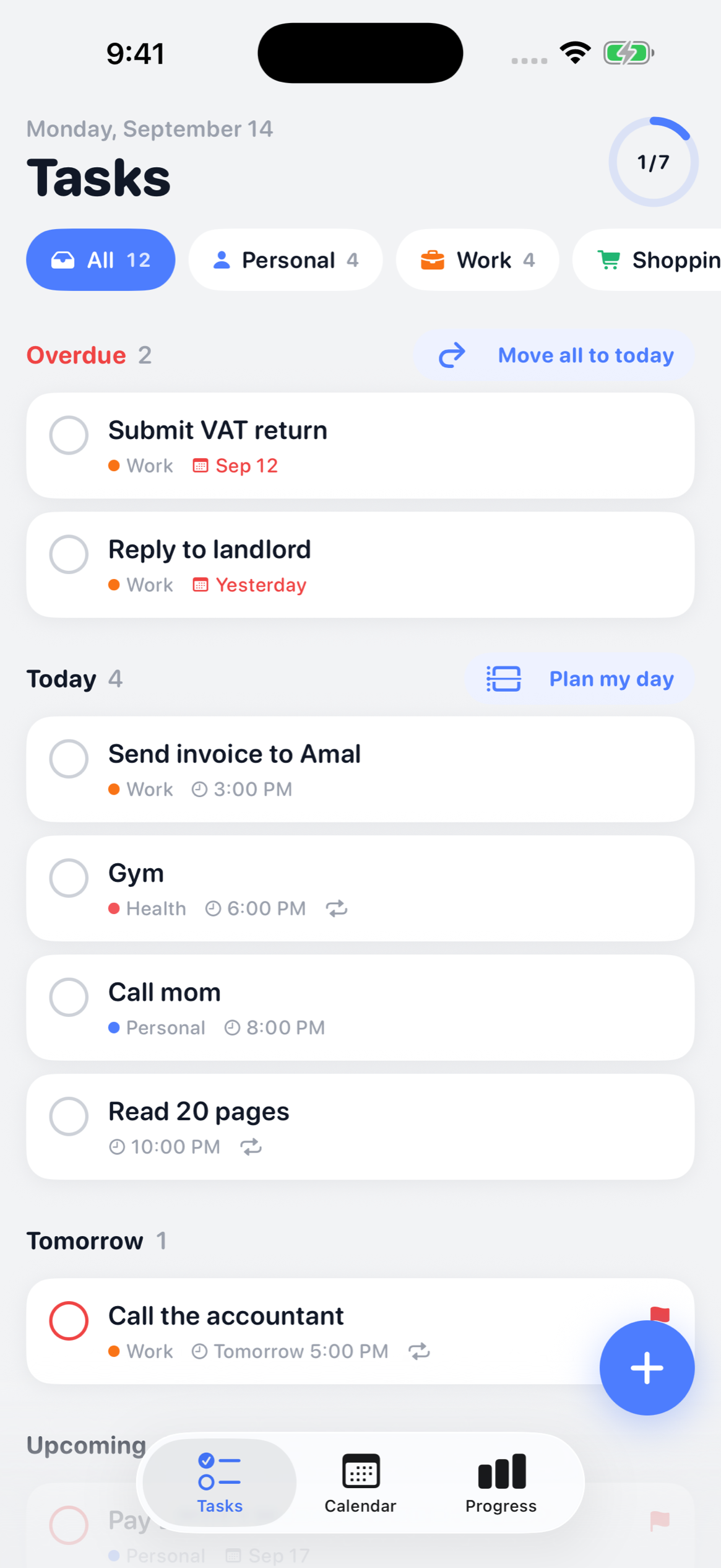
That is the whole structure. Tasks puts overdue, today, tomorrow and upcoming in one list and filters by a tap on any of your lists. Calendar shows the month. Progress shows what you finished this week and what the next seven days hold. No projects, no boards, no priority matrix to configure.
Swipe to finish, swipe to move
Right to complete, left to push it to another day. Both show a toast with Undo for six seconds. Deleting a list without warning is the single loudest complaint in this category's reviews, so nothing here is destructive without a way back.
On the home screen and the lock screen
Widgets in three home-screen sizes and three lock-screen ones, showing what is next. They redraw when the list changes rather than whenever iOS feels like it — the other common one-star review.
Add it without opening the app
Ask Siri, or send text to ToDo from the share sheet in any other app. Both run the same parser, so a shared sentence keeps its date.
Say it, or photograph it
Hold the microphone and talk; the speech becomes text on your iPhone. Or photograph a handwritten note, a notice or a whiteboard and ToDo pulls the tasks out of the picture. Both run on the device.
Plan my day
It reads the gaps between today's calendar events and lays your unscheduled tasks into them, with a suggested length for each. Change any of it, then apply the lot in one tap.
See the week honestly
Progress counts what you actually finished per day, what is still pending and what is coming in the next seven days, broken down by list. No streaks and no guilt mechanics.
Bring your old list with you
Import from Apple Reminders, Todoist or TickTick, with lists, due dates and completion intact. Export a backup file whenever you like and restore it on a new phone.
What ToDo does not do
No sync between devices, yet
Tasks live on the phone that made them. The sync is written but switched off until the iCloud side is set up properly, and shipping a sync that silently does nothing is worse than not offering one. Backup and restore is the bridge in the meantime.
No iPad or Mac app
iPhone only. There is no web version and no Android version. If you need your list on a laptop during the day, this is not the product yet.
No projects, boards or collaboration
No sub-projects, no Kanban, no assigning a task to someone else, no shared lists. It is a personal list. If you are running a team, you want something else and no amount of privacy makes up for it.
It does not write to your calendar
Plan my day can read your calendar, with your permission, to find the gaps between your events. It never writes to it, never copies an event and never uploads one — your tasks do not appear in Calendar, and your meetings do not appear in ToDo.
Straight answers
What is free and what costs money?
The list is free forever — unlimited tasks, lists, dates, repeats, widgets, Siri, the share sheet, imports and backup. Not a trial and not capped. ToDo Pro is $29.99 once and adds the four quick ways to get things in: talking instead of typing, pulling tasks off a photo, Plan my day, and breaking a big task into steps. One payment, Family Sharing on, and no subscription ever.
Do I need an account?
No. There is no sign-up, no email, no password and no “continue with Apple”. You open the app and start typing. That also means nobody can lock you out of your own list.
Where are my tasks stored?
On your iPhone, in the app's own storage. ToDo makes no network connections, so there is no server holding a copy. The App Store privacy label reads Data Not Collected.
What happens if I lose my phone?
Your tasks go with it, which is the honest trade for having no servers. Export a backup file from Settings and keep it somewhere you control — restoring it on a new phone brings everything back. Your iPhone's own iCloud backup also includes the app's data.
Can I bring my tasks over from another app?
Yes, from Apple Reminders, Todoist and TickTick. Lists, due dates and completion state come across. There is no importer for anything else yet.
What does the quick add actually understand?
Dates, times and repeats written the way you would say them. “Friday 2pm”, “tomorrow”, “in 3 days”, “every Monday 6pm”, “daily”. The parsed parts appear as chips while you type and each one is tappable, so a wrong guess costs one tap to fix.
Something wrong? Say so.
Email nahidsaleem1@gmail.com with your iOS version and what happened, and it gets read by the person who wrote the app. There is no support queue and no bot in front of it.