A mileage log that never leaves your phone
DriveSnap notices when you drive, records the trip, and files it. You classify it later with one swipe. Nothing is uploaded, because there is nowhere to upload it to.
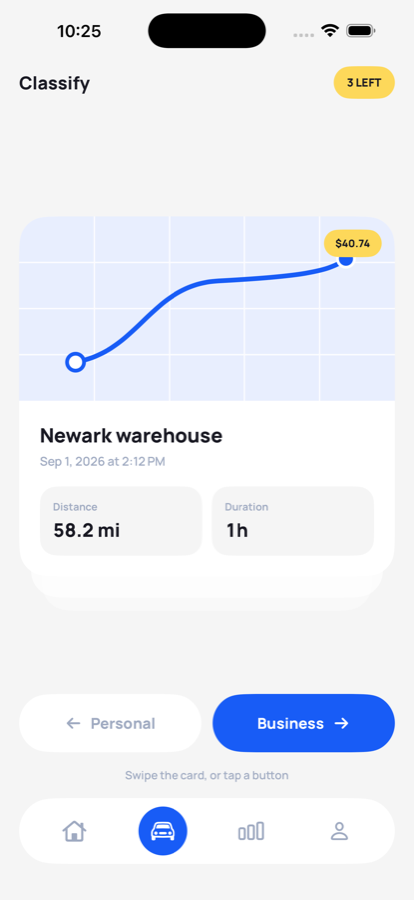
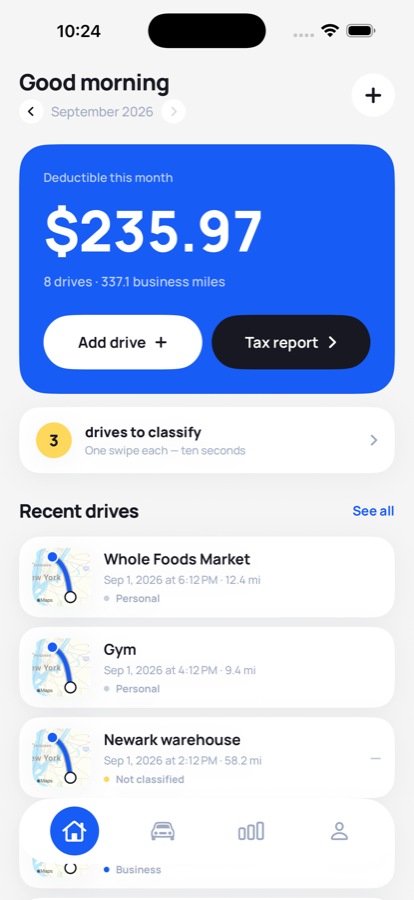
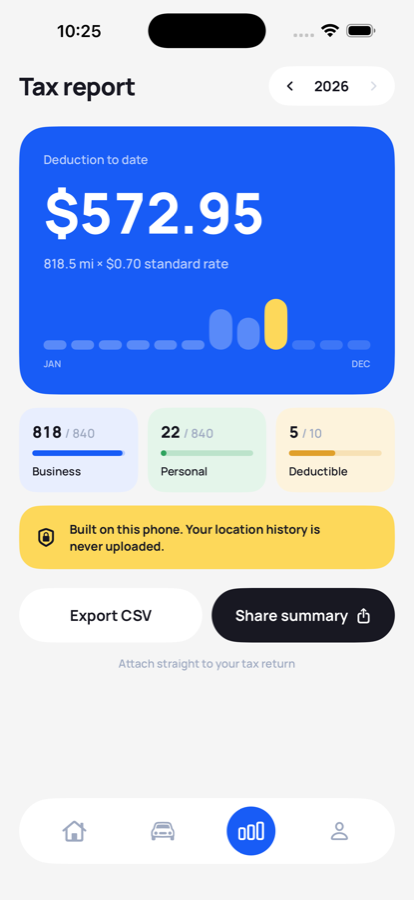
Everything a tax log needs.
Nothing that phones home.
01 · Automatic
Drives log themselves
No timer to start, no trip to forget. DriveSnap notices movement, measures the distance, draws the route, and files the trip while your phone is in your pocket.
02 · One swipe
Business or personal
Each drive becomes a card with the money already worked out. Swipe right or left. Ten seconds a week.
03 · Work hours
Or don't swipe at all
Set your working hours and drives inside them classify themselves. Each one is marked so you can check it before filing.
04 · Tax time
A report your accountant accepts
Every drive dated, categorised, rated and totalled, exported as a CSV. The rate is stamped onto each drive when recorded, so changing it next year never rewrites a year you already filed.
Four steps, then it runs itself
Drive normally
Turn on auto-detection once. DriveSnap uses the same background location and motion services your phone already runs, rather than holding GPS open.
Swipe once a week
Open the Classify tab and clear the queue. The deduction for each drive is shown before you decide, so you are never guessing what a trip was worth.
Let the clock help
Turn on work hours and most of the queue disappears. Anything decided by a rule is flagged, and the report tells you how many there were.
Export at year end
One CSV, one summary. Send it to your accountant or attach it to your return. Keep a backup file so a lost phone is never a lost year.
The numbers that end up on your return
What a business mile is worth on a 2026 US return from 1 July (72.5¢ before that). Editable to your own country's rate.
What a thousand business miles comes to at the rate from 1 July 2026. Most people drive that in a quarter without noticing.
A week of upkeep. Swipe each drive left or right and the log stays complete.
A deleted drive stays recoverable, in case you swipe the wrong way.
No drive caps. Ever.
Most mileage apps stop logging free users at around 40 drives a month. Hit that mid-month and your log has a hole in it — which makes it useless for tax at exactly the moment it matters.
| DriveSnap | Typical mileage app | |
|---|---|---|
| Free drives | Unlimited | ~40 a month |
| Who else can see where you drove | Nobody | Their servers |
| Account required | Never | Yes |
| Yearly price | Free during launch | $100 to $168 |
Competitor figures read from each company's own pricing page and US App Store listing on 21 September 2026: MileIQ $11.66 a month billed annually, Driversnote $11 a month, Hurdlr $99.99 a year. The free tier comparison carries the sources.
It never leaves your phone
A mileage tracker knows everywhere you go. Most of them send that somewhere. DriveSnap has no account to create and no backend to receive anything — not as a promise, but as a fact about how it is built.
The one exception is honest: drawing a route asks Apple for map tiles, which tells Apple roughly where a drive was. Your drives are still never uploaded, and turning maps off in Settings means the app makes no network requests at all.
Everything, free during launch
Version 1.0 is free in full, export included. Recording drives is the part you need every day and it stays free and uncapped whatever happens later.
Free
$0
forever
- Unlimited automatic drive tracking
- One-swipe classifying
- Work-hours auto-classification
- Route maps on every drive
- Full history and monthly totals
Export & reports
$0
included in v1.0
- Everything in Free
- CSV export for your accountant
- Year-end tax report
- Backup and restore
What you never pay for
$0
and never will
- No per-drive fees
- No charge to see your own history
- No upsell to unlock last year
- No ads, ever
Version 1.0 has no in-app purchase. A paid tier is planned for a later update, and the free tracking tier is not going away.
Straight answers
Does DriveSnap upload my location?
No. Drives are detected, measured and stored on your iPhone. There is no account and no DriveSnap server. The only network request the app can make is to Apple's Maps, for the tiles behind a route thumbnail — and that can be switched off in Settings, after which the app makes no network requests at all.
Is there a limit on free drives?
No. Tracking, classifying and browsing your full history are free and unlimited, permanently. Pro unlocks the CSV export and the year-end tax report.
What mileage rate does it use?
You set the rate yourself, in your own currency, in miles or kilometres. It defaults to the US standard business rate, which for the second half of 2026 is $0.76 per mile. The rate in force is stamped onto each drive when it is recorded, so changing it next year never rewrites a tax year you have already filed.
Can I use it for a CRA logbook in Canada?
Only if you are an employee claiming a per-kilometre reimbursement. Self-employed Canadians must use the actual-expense method — business kilometres divided by total kilometres, applied to real vehicle costs — which needs odometer readings at the start and end of the year. DriveSnap does not do that. We would rather tell you than take the download.
What happens to my drives if I lose my phone?
DriveSnap saves a complete backup file with every drive, its route, and the rate it was costed at. Restoring only ever adds drives — it never replaces what is already there. There is no cloud sync, so keeping that backup somewhere safe is worth doing.
Does it drain the battery?
It uses the significant-location and motion services the system already runs for other apps, rather than holding GPS open continuously. With auto-detection off, DriveSnap uses no location services at all and you add drives by hand.
The rules the log has to satisfy
IRS mileage rate 2026: 72.5¢, then 76¢ from 1 July
Two rates in one year, and a calculator that does the split.
MileageWhat the IRS actually requires in a mileage log
Four facts per trip, written down on the day.
MileageHMRC mileage rates 2026/27: 55p a mile
What changed on 6 April, and who can claim the difference.